PEPM Downline Explainer
Per Employee Per Month Compensation
How to use this tool
Set your PEPM rates
Enter the L2 rate (your rate) and the L1 base rate below. The difference is your delta — what L2 earns before overrides.
Set your override amounts
Enter the 1st and 2nd override values — the per-employee amounts paid up the chain when a Child or Grandchild closes a deal.
Enter employee count
Type in the number of employees on a deal to see the total PEPM pool generated, calculated instantly.
PEPM Rates
Delta to L1: $5.00
What L1 agents earn
Child's deal → L1
Grandchild's deal → L1
Total PEPM Pool generated by this deal
$1,000.00
100 employees × $10.00/mo — this pool is split across the hierarchy as shown below
Compensation Hierarchy
L2 originates the pool — flows down to L1
Delta to L1: $5.00/employee (covers all overrides)
Originating affiliate. Earns the delta between L2 PEPM and L1 PEPM, minus any overrides paid out.
Base rate: $5.00/employee
Base-level agent. Earns their standard PEPM on every employee in their book of business.
When Child closes a deal, L1 earns the 1st Override ($3.00) from L2.
When Grandchild closes, Child earns 1st Override ($3.00) and L1 earns 2nd Override ($1.00).
When Great-Grandchild closes, Grandchild earns 1st Override, Child earns 2nd Override. L1 earns $0 — overrides only travel 2 levels up from the deal originator.
Beyond Great-Grandchild — The deal originator earns $5.00/employee. Overrides always travel 2 levels up from whoever closed the deal. L2 always pays the overrides and earns the remainder.
Payout Scenarios
Click each scenario to see how the $10.00 PEPM pool is distributed per employee.
Override Rules
Paid to the agent 1 level above the one who closed.
Paid to the agent 2 levels above the one who closed.
Only 2 levels up from the deal originator receive overrides.
Key: Overrides are paid from L2's delta, not in addition to it. L2 must set their PEPM high enough to cover both overrides and still earn a profit.
Key Rules to Remember
L1 is the base level — all agents start here regardless of how many people they recruit.
L2 earns the delta between their PEPM and L1's PEPM on every employee in the entire downline.
Overrides travel 2 levels UP from whoever closed the deal — not 2 levels below L1.
L2 covers all override costs from their delta. L2 must set their PEPM high enough to cover both overrides and still profit.
Anyone above L2 earns the delta between their PEPM and the level directly below them — no additional overrides.
If L2 does not exist, the first level above L1 is responsible for paying overrides.
Where to Set Your Rates & Generate Your Link
Follow these steps inside your Affiliate Portal to configure your compensation rates and generate a custom referral link for your recruits.
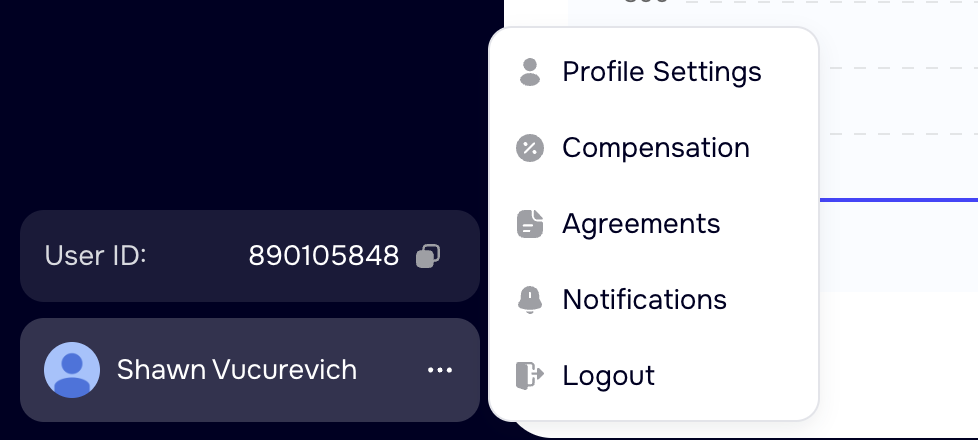
Open the Profile Menu
Click your name or avatar in the bottom-left of the Affiliate Portal, then select Compensation from the dropdown menu.
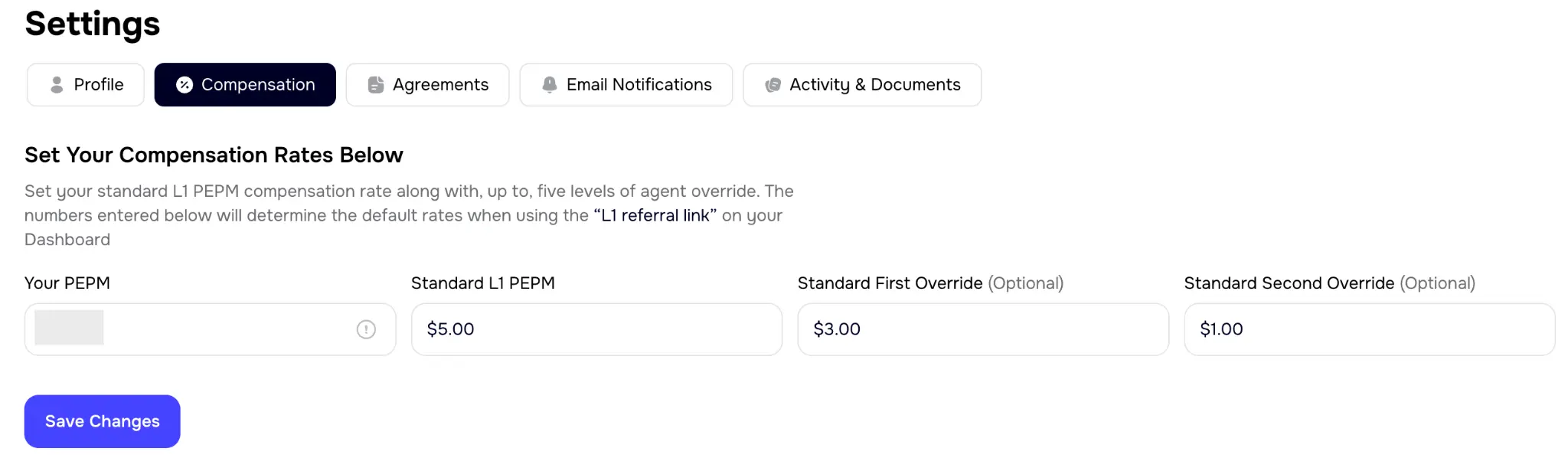
Set Your Compensation Rates
In Settings, click the Compensation tab. Enter your PEPM rate, the Standard L1 PEPM, and your 1st and 2nd override amounts, then click Save Changes.
Generate a Custom Referral Link
From your Dashboard, click TEAM in the navigation menu to access the Custom Referral Link section. Fill in the affiliate's details and click Generate Link.
